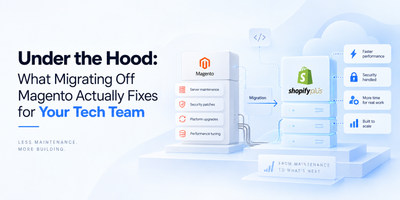
Moving your online store to a new platform feels like renovation day. You know the end result will be worth it, but one wrong move and you're dealing with broken pipes, missing furniture, and a very confused family. A detailed Shopify migration checklist is the only thing standing between a clean switch and an expensive mess.
If you're ready to migrate to Shopify, here's exactly how to do it without losing your data, your customers, or your hard-earned search rankings.
Start with preparing for Shopify Migration
Before touching a single file, do a full audit of your current store.
List every product, customer record, order history, content page, blog post, URL, and third-party integration you currently use. This sounds tedious, and it is. But skipping it means discovering halfway through that 200 product pages didn't make it across, or that your loyalty app has no Shopify equivalent.
Set clear goals at this stage too.
Are you migrating for speed? Scalability? Lower maintenance costs?
Document what success looks like for your team before anyone writes a line of code. When goals aren't defined early, scope creep quietly eats your timeline and budget.
This prep phase is also when you decide what not to bring over. Old product listings with zero traffic, outdated blog posts, and duplicate pages are dead weight on your new store.
Leave them behind and start clean.
The Shopify Data Migration Checklist You Need
The actual data move covers five core areas: products, customers, orders, content pages, and app integrations. Each one needs its own approach, and none of them should be rushed.
For most stores, CSV imports handle basic product and customer transfers. More complex catalogs with custom attributes, bundled products, or tiered pricing often need third-party migration tools or the Shopify Admin API. Whatever method you choose, run a full test migration on a staging environment first. Skipping this step is how stores go live, missing half their inventory.
One thing that catches brands off guard during e-commerce migration to Shopify is that customer passwords cannot be transferred between platforms. Encryption differences make this technically impossible. The workaround is simple: send a password reset email after launch, and pair it with a small discount code to make it feel intentional rather than broken.
Also, use this phase to clean your data before moving it. Fix incorrect product descriptions, outdated pricing, and bad SKUs now. Moving messy data just creates messy problems on the other end.
Your Shopify SEO Migration Checklist
This is the section most brands underestimate, and it's where migrations quietly destroy months of organic growth.
Here's the thing about URLs: Most brands don't think about them until it's too late.
When your Shopify store migration changes your URL structure, Google doesn't automatically follow along. It sees a fresh page with zero history, zero backlinks, and zero trust built up.
All that ranking equity you earned over months or years just disappears into the void, unless you've mapped 301 redirects for every changed URL. And we mean everyone, not a blanket redirect to your homepage. That lazy shortcut tanks your SEO faster than almost anything else.
Beyond redirects, your Shopify SEO migration checklist should also cover the less glamorous stuff. Meta titles and descriptions need to come across intact. Structured data markup has to be rebuilt or verified on the new theme. Canonical tags deserve a manual check because Shopify handles them differently than most platforms.
Once you're live, submit a fresh XML sitemap to Google Search Console the same day, not a week later.
There's also a discipline that separates smart migrations from messy ones. Keep the number of simultaneous changes as small as possible.
Yes, you want a fresh design. Yes, the copy could use a refresh.
But doing all of that at the same time as the platform move means if your traffic dips in week two, you'll have no idea what caused it. Change one thing at a time. Get a baseline. Then improve from there.
The Pre-Launch Phase of Your Shopify Replatforming Checklist
Data moved, redirects in place. Now comes the part where most teams rush, and where most post-launch fires actually start.
Go through checkout on both desktop and mobile yourself. Don't delegate this. Click through the full purchase flow, use a real payment method in test mode, and verify that each gateway processes as expected. Then check your third-party stack: analytics, ad pixels, shipping integrations, and inventory tools. If even one of those is silently broken, you won't know until a customer does.
On the DNS side, lower your TTL setting a couple of days before your planned go-live. Most people forget this and then wonder why their domain is still pointing at the old store six hours after launch. When you do flip the DNS, lock the old store immediately. Two live stores, one domain transition, and an open checkout make for lost orders and very confused customers.
Teams like Seventh Triangle, known as reliable Shopify Plus Partners in India, approach this phase with a sequenced launch checklist, working through every item in order rather than scrambling on the day. That kind of pre-planned discipline is what separates a smooth go-live from a chaotic one.
Post-Launch Monitoring: The Part of This Shopify Migration Guide Nobody Talks About
Going live is not the finish line. It's where active monitoring begins.
For the first two to four weeks, check Google Search Console daily. Watch for 404 errors, ranking drops, and crawl issues. Verify that conversion tracking events, such as Add to Cart and Purchase, are still firing correctly in your analytics setup.
If a page drops in rankings, investigate immediately. A missing redirect or a misconfigured canonical tag is almost always fixable within minutes if you catch it early. Left alone for weeks, the damage compounds.
This ongoing vigilance is also where decisions like Magento or Shopify become clearer in hindsight. Shopify's built-in tooling makes post-migration monitoring significantly more accessible for non-technical teams, which changes how quickly you can respond to problems.
Wrapping Up Your Shopify Migration Checklist
A successful step by step shopify migration comes down to three habits: thorough preparation, careful data handling, and treating SEO as a first-class concern throughout.
Use this Shopify migration checklist as your anchor from day one. Audit before you move. Test on staging before you launch. Set your redirects without exception. Monitor closely for a month after go-live.
Done right, the move to Shopify is one of the best operational decisions a growing e-commerce brand can make.
Done carelessly, it is a very expensive lesson in why checklists exist.